Symphony Orchestra Simulator Admin Command Menu (Infinite Yield Style)
Feature overview for the command GUI players use in the concert hall—plus the ban risk you should not ignore.
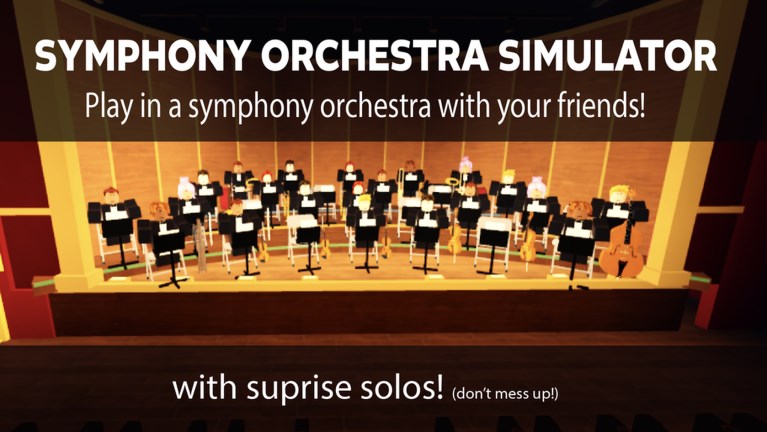
The most talked-about third-party tool for Symphony Orchestra Simulator is an Admin Command Menu in the Infinite Yield style: a floating GUI with a command bar, aliases, and toggles. This page explains what that kind of script usually offers, how players try to run it, and why it can still cost you the account. It is not a recommendation to cheat in merpug01’s concert hall.
If you want the legitimate fantasy—sixteen instruments, song votes, spotlight solos with roses or tomatoes, audience cheers, Request Concerto, and coin-bought entrances—leave this page and open Getting Started. For the wider script policy, return to the Scripts Hub.
Strong warning (read this first)
- Using an executor injects code into the Roblox client. That can violate Roblox rules.
- Bans can be temporary or permanent and may include related accounts.
- “Admin” in the GUI name does not mean you become a real experience admin. You are running clientside commands, not receiving developer rank from merpug01.
- Stolen or modified loadstrings can steal session cookies. Paste carefully, or better, do not paste at all.
- This wiki will not help you evade detection, crash servers, or harass players in a 35-person hall.
If any of that is unclear, stop here. The orchestra plays fine without a command prompt.
What the Admin Command Menu is
Infinite Yield–style menus are general Roblox utility GUIs. For Symphony Orchestra Simulator they are typically advertised as:
- Admin Command Menu access
- A movable GUI with search
- Prefix commands typed into a bar or chat-like field
- Quality-of-life toggles that work in many places, not music-specific autoplay bots
In practice, players open the menu while seated with a violin, cello, trumpet, flute, harp, timpani, or another instrument, then run movement or utility commands during downtime between songs such as Ode to Joy, Can-Can, Canon in D, Swan Lake, In the Hall of the Mountain King, or Flight of the Bumblebee. That does not make the tool “made for orchestra gameplay”—it makes it a generic injector GUI used inside this place.
Common feature categories
Exact forks differ, but feature groups usually look like this:
Interface
- Draggable command window
- Searchable command list
- Categories or tabs for movement, player, world, and misc
- Keybind to reopen the menu after closing it
Movement and camera helpers
- Walkspeed / jumppower adjustments
- Fly, noclip, or similar traversal toggles (availability varies)
- Freecam-style views for filming audience mode or stage shots
Utility
- Rejoin / refresh shortcuts
- Player list extras or ESP-like name tags in some builds
- Lighting or fog helpers for screenshots
- Server information readouts
Social / grief-adjacent commands
Some menus expose tools that can annoy others (teleport spam, loud effects, disruptive physics). Using those in a cooperative concert hall is the fastest way to get reported on top of any automated detection. Do not treat other musicians as test dummies.
Example loadstring pattern
Public posts often share an Infinite Yield–style line shaped like this:
loadstring(game:HttpGet("https://raw.githubusercontent.com/EdgeIY/infiniteyield/master/source"))()Notes about that pattern:
- It only runs inside a third-party executor after you join the experience.
- The URL target can be swapped by bad actors. Always inspect where
HttpGetpoints before running anything. - Success on one patch does not mean it works after a Roblox or place update.
- Running it does not redeem promo codes, grant coins for fireworks entrances, or finish a Request Concerto for you.
We show the pattern so you recognize what people mean by “the command menu script.” Recognition is not permission, and it is not a support contract.
How players typically attempt to run it
High-level flow only—no executor brand endorsements:
- Install a compatible executor on a device that still allows injection (many setups break after security updates).
- Launch Roblox and join the official Symphony Orchestra Simulator place.
- Paste the full loadstring into the executor editor.
- Execute, then look for the Admin Command Menu GUI.
- Type or click a command from the list.
If nothing appears, the script may be blocked, outdated, or incompatible. Download more copies from random comments until something “works” is how people get malware. Prefer deleting the tool.
What this script does not reliably do
- Guarantee roses instead of tomatoes on your solo spotlight
- Auto-win song votes for your preferred classical track
- Permanently unlock every coin entrance (confetti, fireworks, lightning) without detection risk
- Give real developer admin on universe 10772237634
- Replace practice on your chosen instrument seat
Marketing blurbs that claim “infinite coins + auto concerto + undetected forever” are hype. Match feature claims against the GUI you actually see after execute.
Account risk scenarios
| Behavior | Risk notes |
|---|---|
| Opening the GUI once on a main account | Still detectable; not “harmless curiosity” in policy terms |
| Speeding across the stage during a live song | High report chance from other players |
| Sharing your executor with cookie login | Credential theft risk on top of ban risk |
| Using paid “private orchestra scripts” | Often reskins of the same menu plus scam potential |
| Stacking multiple injectors | Instability and higher odd behavior signatures |
If you cannot afford to lose the account, do not run the menu. Period.
Better alternatives inside the real game
- Learn seating and etiquette via Getting Started.
- Pick instruments using community fun/visibility takes on the Instrument Tier List.
- Watch Updates for legitimate features instead of script changelogs.
- Ignore fake code generators; none are verified active as of November 2026.
Filming a clean POV solo or practicing timing for center-stage concertos will age better than a command bar screenshot.
Related links
- Scripts Hub — category overview and policy tone.
- Codes Hub — official rewards status.
- How to Redeem Codes — for real gifts only, not loadstrings.
- Getting Started — intended player path.
Final reminder: the Admin Command Menu is a clientside executor GUI with convenience commands and serious moderation risk. Use the knowledge on this page to stay informed—or to decide the smarter move is staying unscripted in the orchestra.
Frequently Asked Questions
Quick answers to the most common questions.
Does the Admin Command Menu give real admin in Symphony Orchestra Simulator?
No. The name refers to a clientside command GUI style. You do not receive developer permissions from merpug01 by running it.
Is the Infinite Yield style loadstring undetectable?
No credible source can promise that. Executors and injected GUIs always carry ban risk that can change after Roblox security updates.
Will this script unlock confetti, fireworks, and lightning entrances?
Do not rely on it. Those entrances are coin unlocks in normal gameplay. Script unlock claims are unreliable and risky.
Can I use the command menu and still redeem promo codes?
Codes are a separate official system (none verified active now). Mixing executors with normal play still exposes the account to detection.
What should I use instead if I only want quality-of-life?
Use Roblox's built-in settings, practice instrument seats, and follow wiki guides. There is no risk-free injected replacement.