Symphony Orchestra Simulator Players & Community
Fill the hall kindly—friends, etiquette, and how to find your section partners.
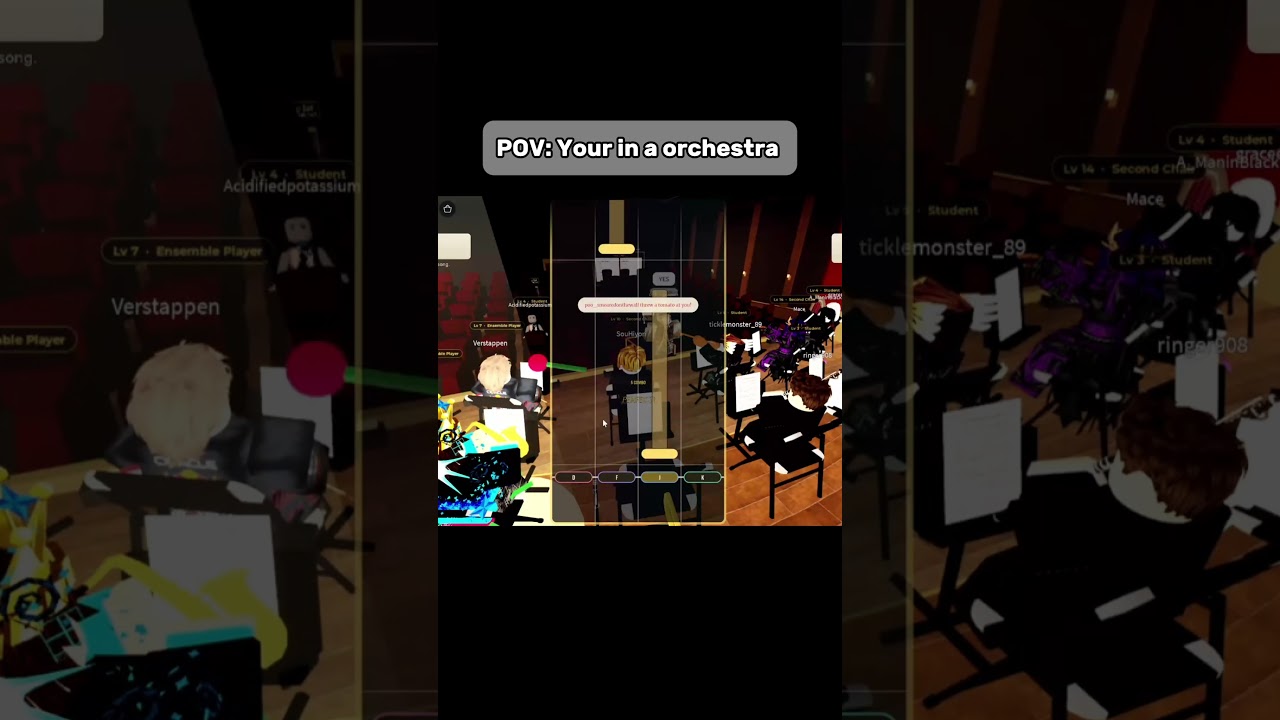
Symphony Orchestra Simulator is a social Music & Rhythm experience first. Up to 35 players share a concert hall, claim 16 instruments, vote classical pieces, cheer from the audience, and take solo spotlights while roses or tomatoes fly. This Players Hub covers community etiquette, practical ways to find friends on Roblox, and how to respond to the in-game call to JOIN THE NEW DISCORD without relying on invented invite links.
Official play link: Symphony Orchestra Simulator on Roblox by creator merpug01. For wiki navigation across systems, see Official Links.
Why etiquette matters here
Unlike combat games where grief is “just PvP,” a concert hall breaks when people treat seats, solos, and audience tools as weapons. Good manners keep servers full, votes interesting, and concertos worth requesting. Bad manners empty a 35-player room until only AFK mannequins remain.
Do
- Claim free seats cleanly; do not hover-steal while someone is mid-prompt.
- Keep your instrument song after song when you are committed—random reseating chaos hurts sections.
- Vote once with intent; accept the winner and play it.
- Cheer and throw roses for soloists, especially newcomers.
- Use tomatoes as light comedy among friends who are in on the joke.
- Leave center stage after your concerto so others can perform.
- Help first-timers with a link to Getting Started instead of gatekeeping.
Don’t
- Harass players who get booed—crowd tools are toys, not licenses to bully.
- Block aisles or center stage during someone else’s spotlight.
- Spam chat over quiet pieces like Canon in D just to be loud.
- Push shady coin sites or account-risk scripts; read Scripts if you must discuss utilities.
- Invent “staff” ranks or fake Discord invites in chat.
Finding friends for a better hall
Fuller rooms usually mean better votes and more audience energy. Ways to party up:
- Roblox friends list — join from the official game page together so you land in coordinated sessions when possible.
- In-experience chat — short, polite invites (“Need a cellist for Mountain King?”) beat walls of caps.
- Audience meetup — sit together in audience seats first, then claim instruments as a block using the Seat Planner goals.
- Shared goals — agree whether tonight is chill Canon/Swan Lake or chaotic Can-Can/Bumblebee before arguing mid-vote (Songs and Voting).
- Clip nights — schedule a concerto rotation so everyone gets center stage instead of competing blindly.
If a friend disconnects, hold their preferred seat only within reason; endless seat-camping while they are gone frustrates strangers. Communicate.
Discord: follow the game, don’t invent links
The experience messaging encourages players to JOIN THE NEW DISCORD. This wiki will not invent an invite URL. Safe paths:
- Use any Discord button or prompt shown inside the Roblox experience.
- Check the Roblox game page social links and description for creator-posted destinations.
- Follow announcements from merpug01 through official Roblox channels linked from that page.
- Treat random chat invites as untrusted until they match what the game or creator posts.
When a stable official invite is published publicly in a verifiable place, the Official Links hub can be updated. Until then, prefer first-party prompts.
Roles people naturally play
Not everyone needs to solo every night:
- Section regulars — keep one instrument across many songs; the backbone of the fantasy.
- Spotlight seekers — chase concertos and coin entrances (Earn Coins).
- Audience hosts — cheer, throw roses, and welcome newcomers.
- Vote shepherds — gently steer repertoire without tyranny.
- Teachers — explain controls with patience (Controls).
Healthy servers rotate these roles. If every friend insists on timpani and lightning at once, expect conflict—plan seats ahead.
Conflict resolution cheat sheet
- Seat dispute: whoever sat first keeps it for the song; losers pick backups or audience.
- Tomato spam: ask once for chill; mute/report if it becomes harassment.
- Vote wars: alternate party picks; do not hold the server hostage.
- Failed concerto vibes: laugh, reset, try after the next piece.
- Lag accusations: check your own connection before blaming soloists.
Cross-links for community players
- Guides Hub — full how-to list.
- Getting Started — onboard friends fast.
- How to Solo — spotlight culture.
- Songs and Voting — shared playlist language.
- Tier List — instrument preference talks.
- Updates — patch-aware community norms.
- Codes — only when real promos exist.
- Tools — planning utilities like the seat checklist.
Hosting a welcoming session (template)
- Meet in audience rows and say hi.
- Assign roughly balanced sections; leave room for strangers.
- Warm up with a friendly vote (Ode to Joy / Canon in D).
- Offer one supported concerto with roses ready.
- Rotate a second spotlight to a newer player.
- End on a crowd-pleaser so people leave happy and want to return.
Community is the invisible instrument in Symphony Orchestra Simulator. Tune it carefully, and even a random public server can feel like a rehearsed ensemble. Bring friends, follow official Discord prompts only, keep tomatoes theatrical, and leave every soloist with enough dignity to stay for the encore.
Frequently Asked Questions
Quick answers to the most common questions.
How do I find the Discord?
Follow the in-game “JOIN THE NEW DISCORD” prompt or social links on the Roblox game page. This wiki does not invent invite URLs.
What is good concert etiquette?
Respect seats, vote fairly, support solos with roses, keep tomatoes light, and clear center stage after your own concerto.
How many players per server?
Up to 35 in online multiplayer. Fuller halls usually mean better votes and audience energy.
Where should I send new friends?
Share Getting Started and the official Roblox link, then optionally the Seat Planner for first-night goals.